 Progz
Set up your AI property advisor, one project at a time
A step-by-step guide for builders, developers and real estate agencies. One AI employee calls every enquiry for every project within a minute, in Telugu, Hindi or English, and books the site visit.
Progz · progz.in · The screens in this guide come from a demo business, “Green Valley Ventures”, with an AI employee called Ananya and three sample projects. Names, numbers, approvals and prices are examples, not real projects.
What's inside
- 1What Progz does for a real estate business
- 2Before you start: a sheet for every project
- 3Create your account
- 4Hire Ananya and set up your first project
- 5Phone number, WhatsApp, calendar and a test call
- 6Add your other projects, one by one
- 7Send each project's buyers to the right project
- 8Day to day: buyers, site visits and your team
- 9Credits and GST invoices
- 10Tips, safety and quick fixes
1. What Progz does for a real estate business
Property enquiries go cold fast. A buyer who fills a form on Facebook at 9 pm has usually called two other builders by morning. Ananya calls back within about a minute, in the buyer's language. She explains the project they asked about, asks your questions and books the site visit.
- Calls every new enquiry within a minute, inside your calling hours
- Speaks Telugu, Hindi and English, and switches when the buyer does
- Explains the project using only the details you wrote
- Asks your questions: configuration, budget, timeline, loan
- Your rules decide who is offered a site visit
- Books the visit and sends the confirmation on WhatsApp and email
- Hands unclear cases to your team as a task
- Promise returns, price appreciation or rental income
- Negotiate prices, offer discounts or hold units
- Claim approvals (RERA, DTCP, HMDA, bank tie-ups) you did not write down
- Quote prices you left out
- Tell a buyer why they were not a fit
How one enquiry goes
- A buyer fills the enquiry form for Green Valley Heights from your Instagram ad.
- Within a minute Ananya calls: “Namaskaram! I'm Ananya from Green Valley Ventures. You asked about Green Valley Heights in Tellapur…”
- She answers their questions from that project's details and asks your questions, one at a time.
- Your rules for that project decide: a site visit now, a call back later, or a polite thank-you.
- The visit goes into your calendar, and the buyer gets the time, the address and how to reschedule.
2. Before you start: a sheet for every project
The time goes into knowing your projects, not into the app. Before you sit down, gather this for each project. A brochure and the price sheet are usually enough.
| Detail | Example (plots) | Example (apartments) |
|---|---|---|
| Project name | Temple View Enclave – open plots near Yadagirigutta | Green Valley Heights – 2 & 3 BHK apartments, Tellapur |
| Location with a landmark | Bhongir–Yadagirigutta Road, near Raigiri | Tellapur, 10 min from the ORR |
| Configurations | Open plot | 2 BHK, 3 BHK |
| Sizes (sq ft) | 1,350–2,700 (150–300 sq yd) | 1,180–1,850 built-up |
| Price range (or leave it out) | ₹20 lakh – ₹44 lakh | ₹78 lakh – ₹1.25 crore |
| Possession | Ready for registration | December 2027 |
| Approvals | DTCP LP number | RERA number, HMDA |
| Amenities, size, loan tie-ups | BT roads, 250 plots on 18 acres, SBI | Clubhouse, pool, 3 towers G+15, SBI/HDFC |
| Site-visit address | Site office address | Sales office address |
| Common answers | Booking amount, registration charges, weekend visits | Booking amount, maintenance, parking, model flat |
| Your fit rules | Min. budget ₹15 lakh, buying within 180 days | Min. budget ₹70 lakh, buying within 180 days |
Also keep ready (once, for the business)
- Your email address to sign in with. You'll confirm it with a 6-digit code.
- Your business WhatsApp number and a Facebook login. Confirmations go from your own number. The number must not be in use on the normal WhatsApp app on a phone.
- A Google account with your sales calendar, so site visits are booked into it.
- Your business details for the phone company (a one-time, roughly 5-minute verification) to get your calling number.
- A UPI app or card to add credits (from ₹500 plus GST), and your GSTIN if you want GST invoices.
3. Create your account
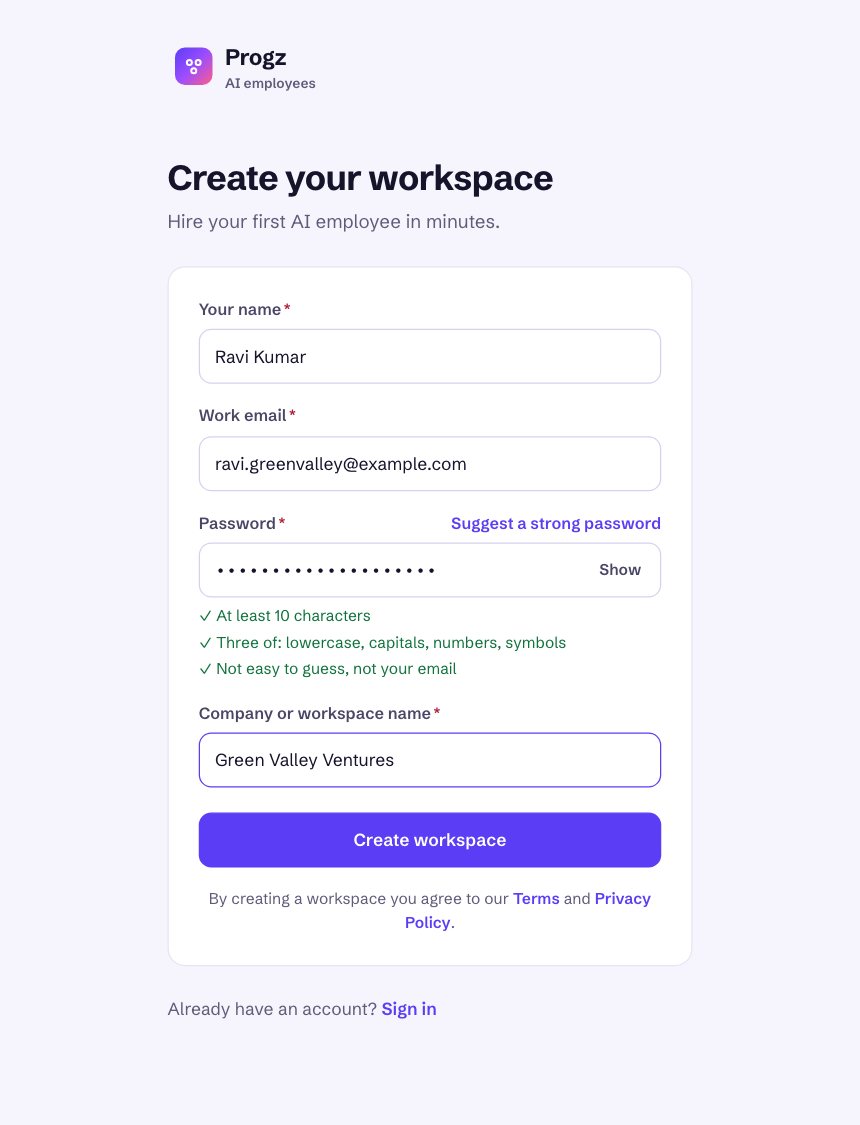
Sign up
Go to progz.in and click Start free. Fill in your name, work email, a password (at least 10 characters) and your company name, then click Create workspace.
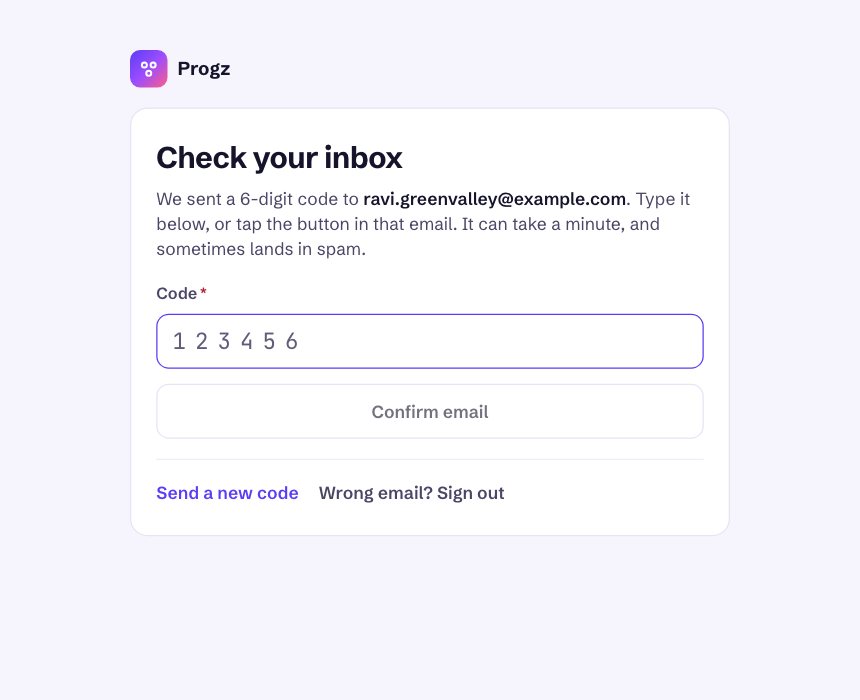
Confirm your email
We email you a 6-digit code. Type it in and click Confirm email, or tap the button in the email. Check spam if it hasn't arrived within a minute.
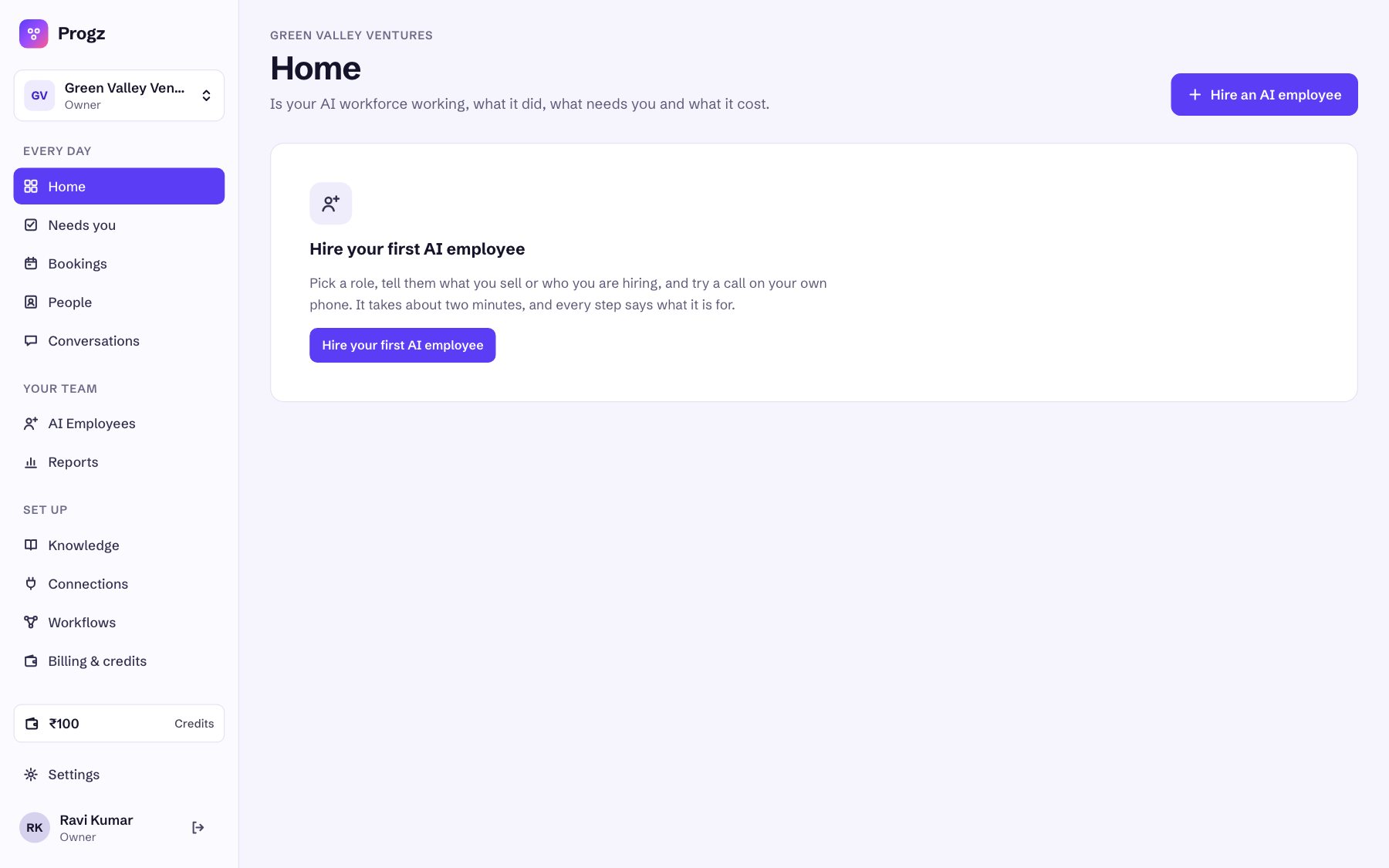
You arrive on Home
Every new business starts with ₹100 of free credits (bottom left). Click Hire your first AI employee.
4. Hire Ananya and set up your first project
A short wizard. Start with the project you get the most enquiries for. You'll add the others in section 6.
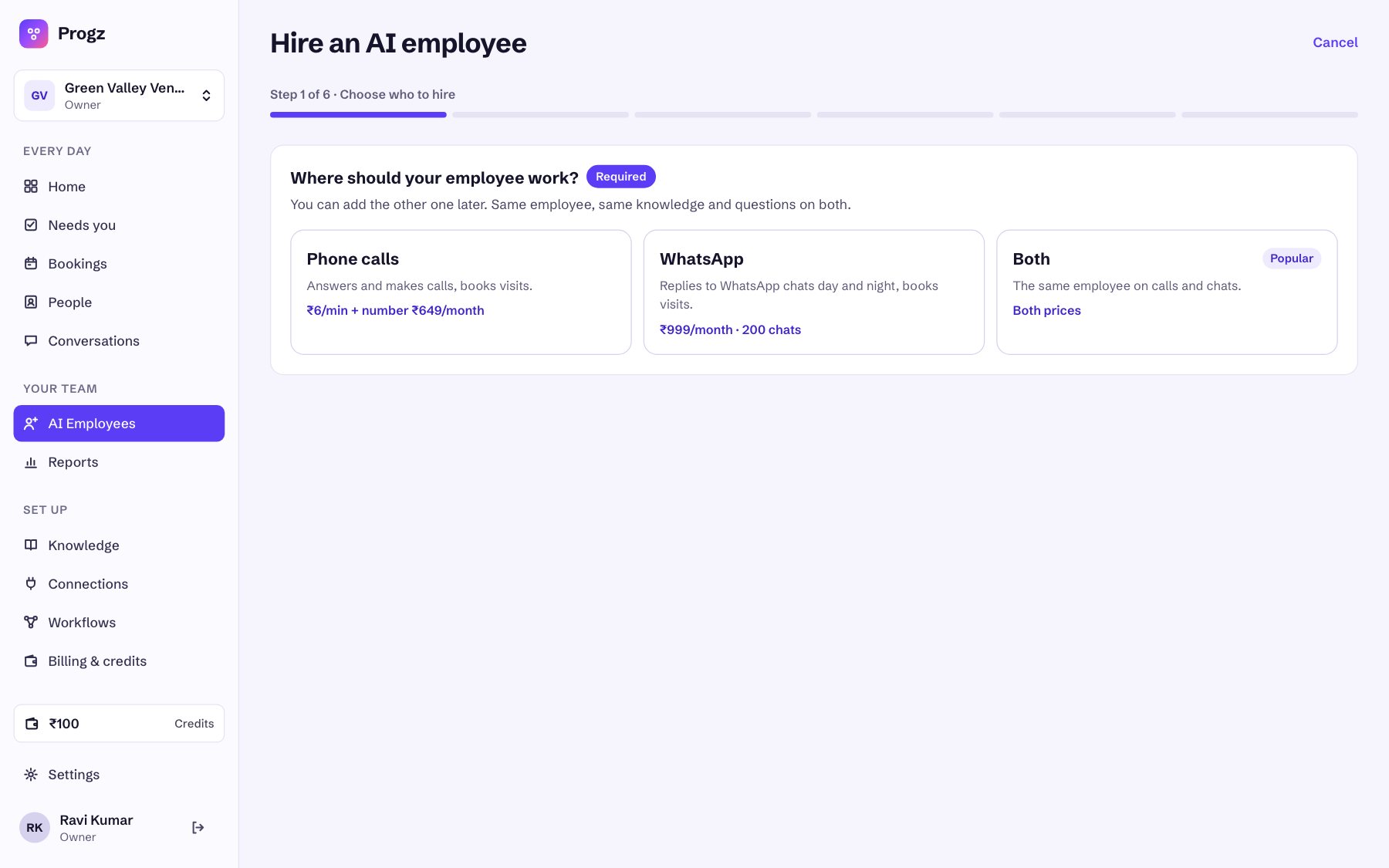
“Where should your employee work?”
Choose Phone calls (₹6 a minute plus ₹649 a month for the number). This is what most builders need: Ananya calls every enquiry. Choose Both if you also want her to answer WhatsApp chats (₹999 a month, 200 chats). You can add the other one later.
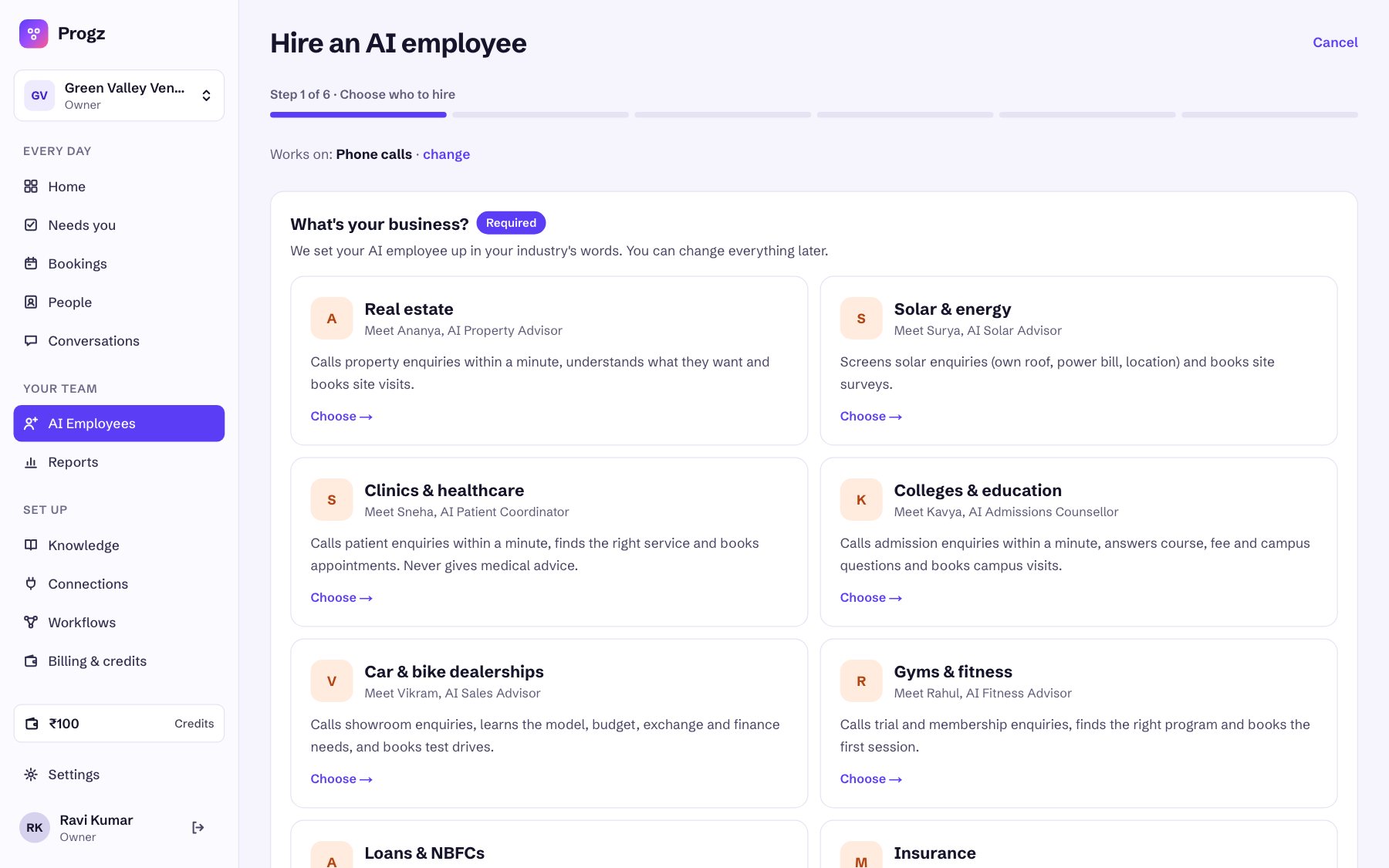
“What's your business?”: choose Real estate
This sets Ananya up in property words: buyers, projects, site visits, BHK, possession, RERA.
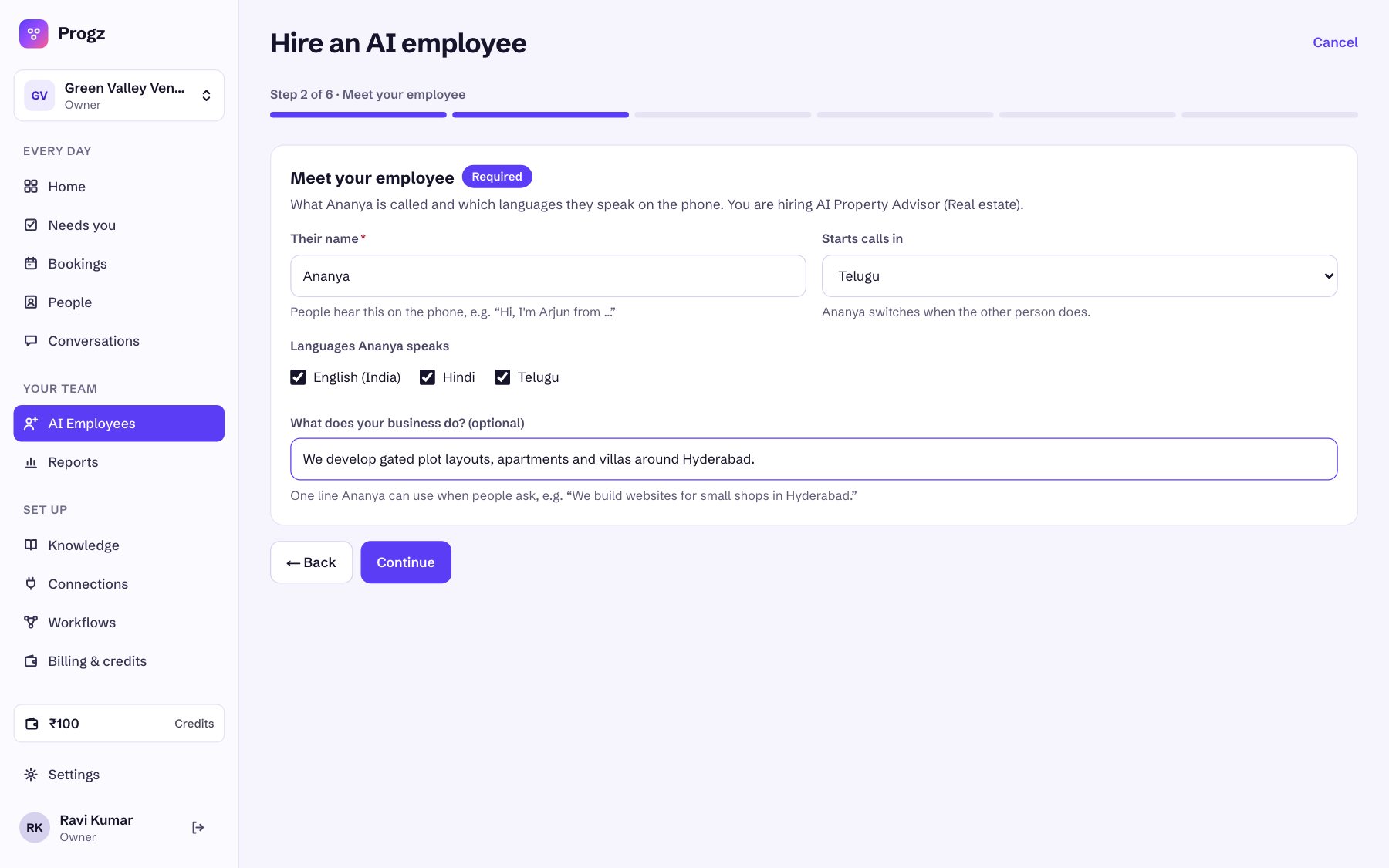
Meet your employee
“Ananya” is filled in; keep it or type another name. Telugu, English and Hindi are ticked. Choose which language calls start in. Add one line about your business, e.g. “We develop gated plot layouts, apartments and villas around Hyderabad.” Then click Continue.
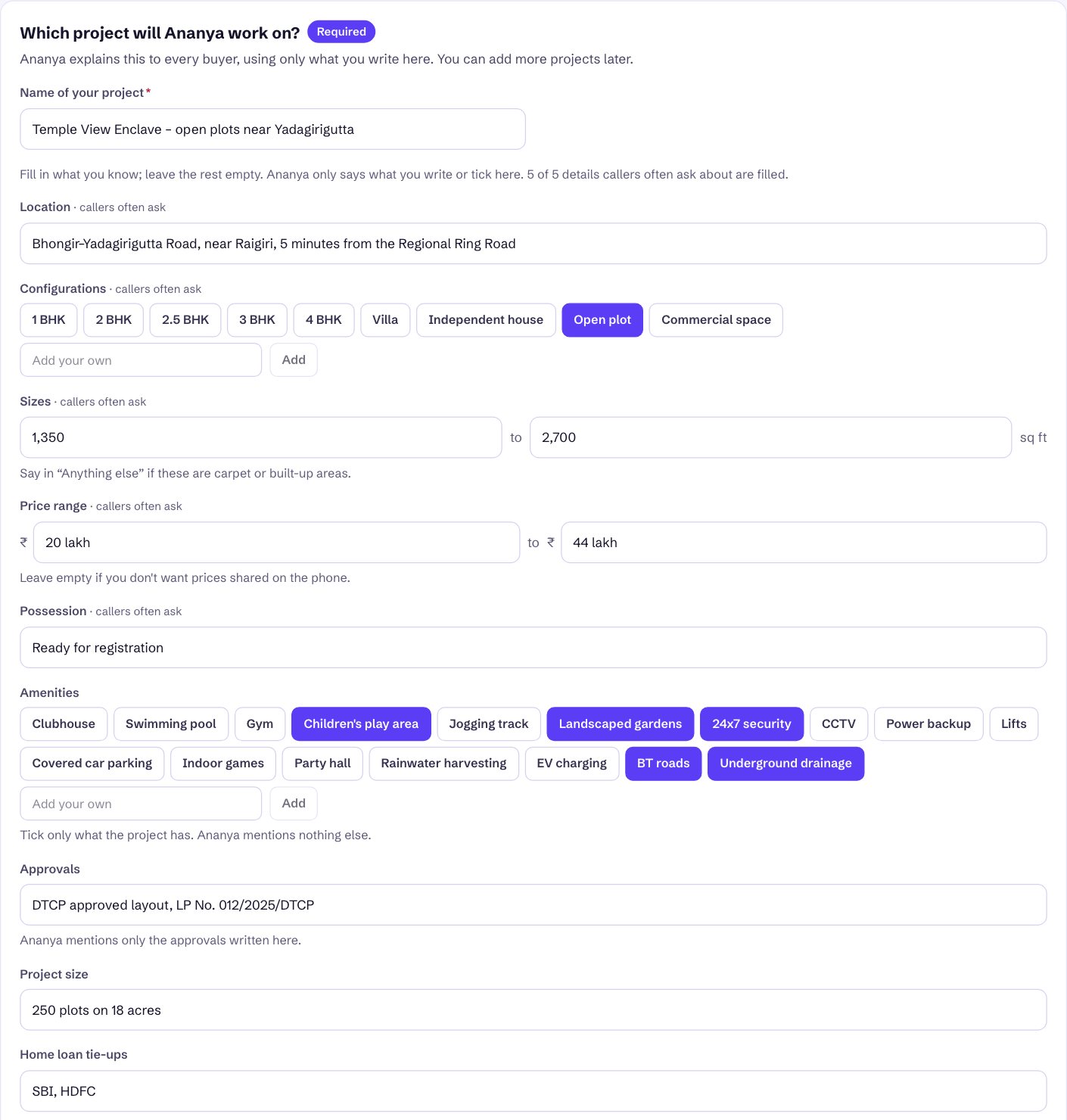
“Which project will Ananya work on?”: your first project
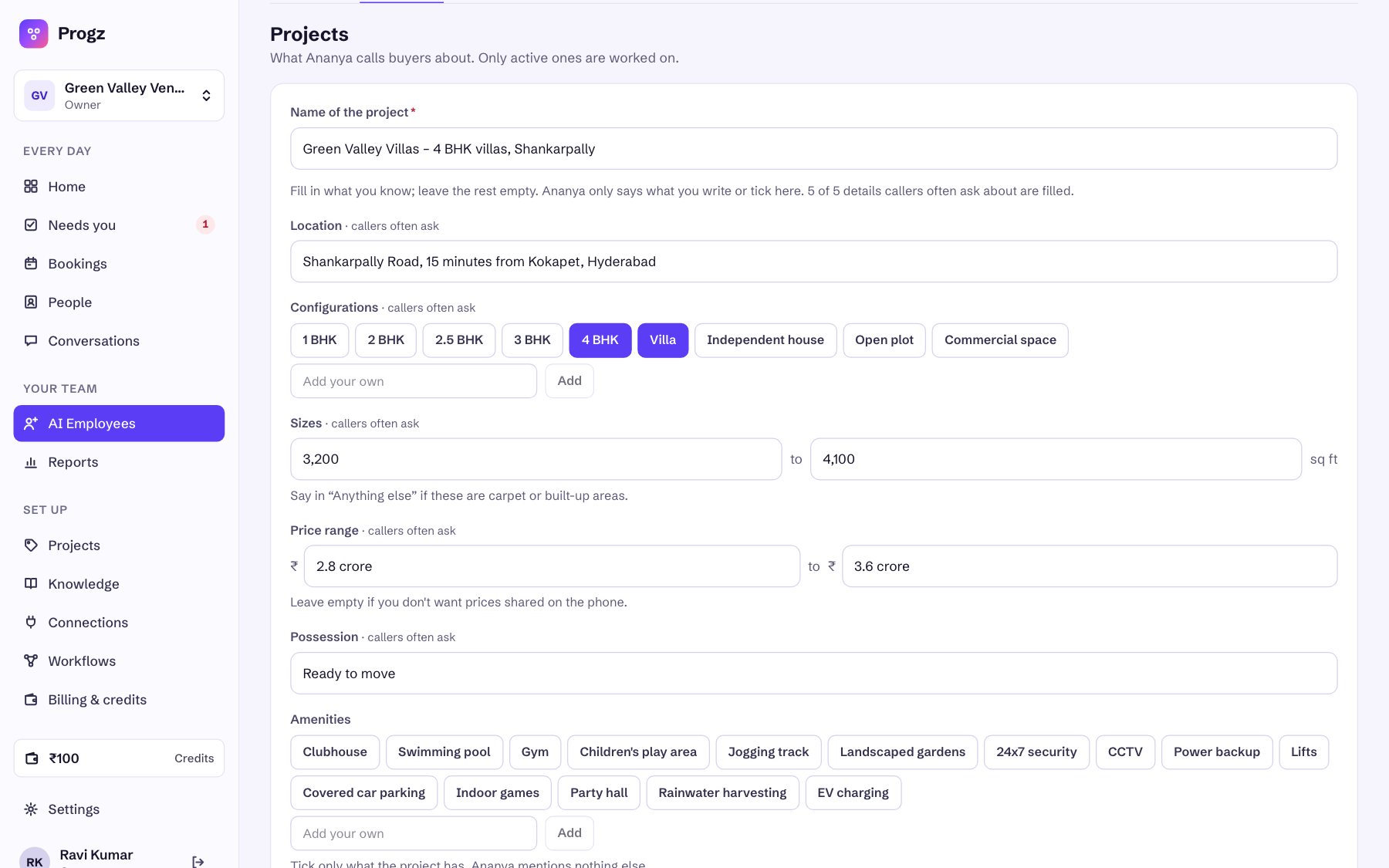
Give the project a clear name that buyers would recognise, including the type and area. Then fill the short form from your project sheet. Ananya says only what you write or tick here. The grey example text never reaches a call. The form counts how many of the 5 details callers ask most about are filled.
Getting the project form right
- Sizes are in sq ft. For plots, convert square yards (× 9) and also write the yards in Anything else, e.g. “Plot sizes 150 to 300 square yards”. For flats, say there whether sizes are carpet or built-up.
- Price range: type it as you'd say it, e.g. 20 lakh, 1.25 crore. Leave both boxes empty if you don't want prices given on the phone; Ananya then says your team will share the price at the visit.
- Approvals: write the exact RERA / DTCP / HMDA number. Ananya never claims an approval that isn't here.
- Anything else: facing, Vaastu, road widths, distances to landmarks, model flat, show villa.
- Open What Ananya will know to read the exact summary she works from, e.g. “Price range: ₹20 lakh to ₹44 lakh”.
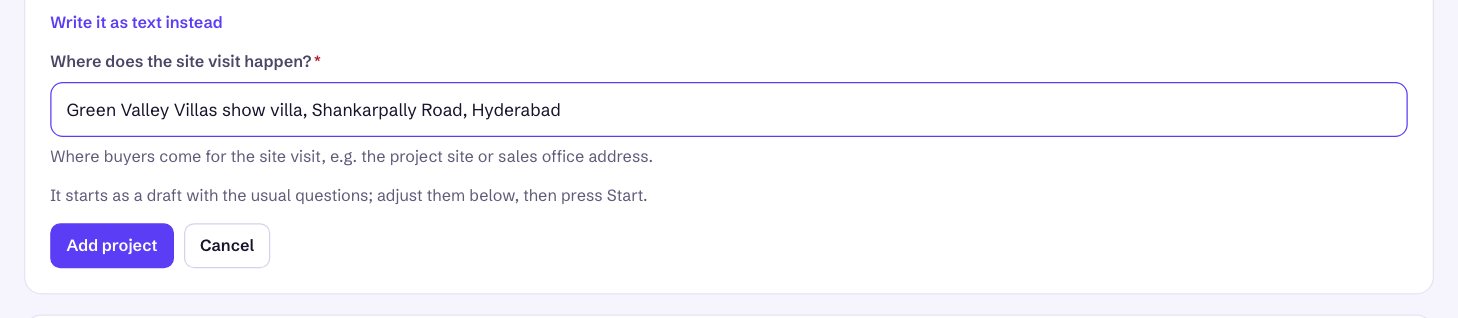
- Where does the site visit happen? (required): the site office or sales office address. It goes into every confirmation, so add a landmark.
The questions Ananya will ask
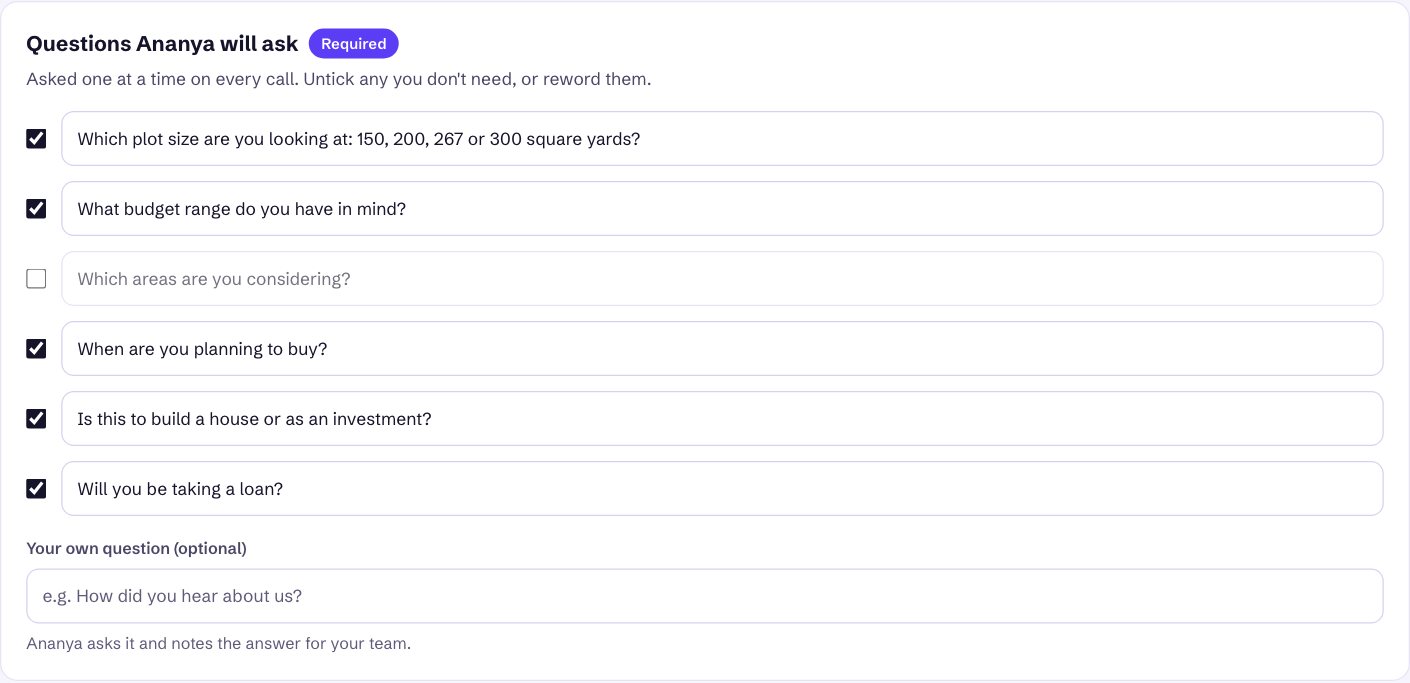
Six usual questions come ticked. Make them fit the project: for plots, reword the first one to list your plot sizes; untick “Which areas are you considering?” when the project has one location. You can add one question of your own, e.g. “How did you hear about us?”.
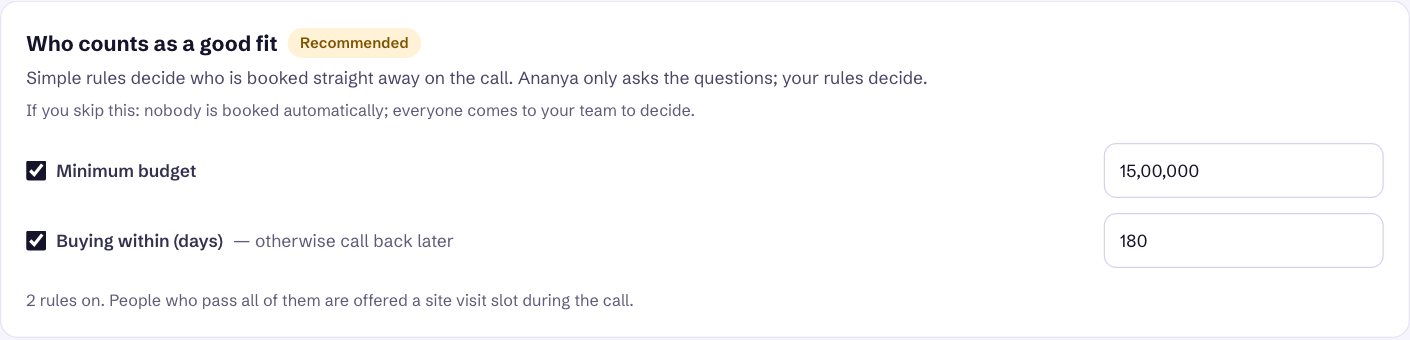
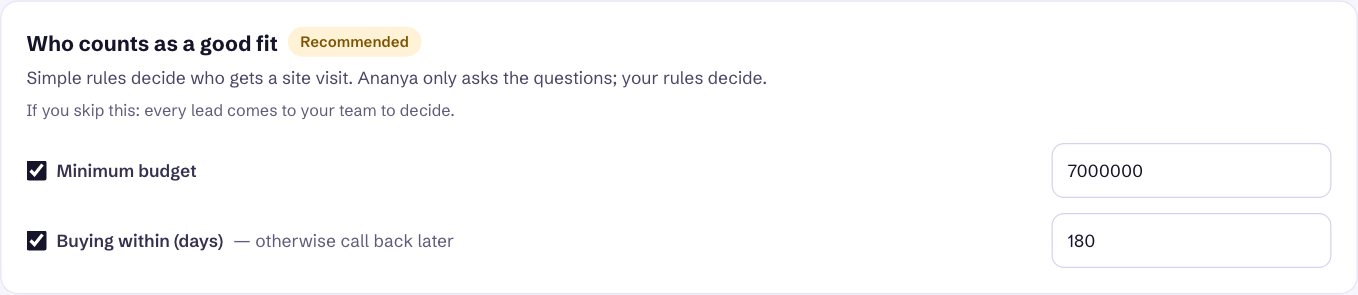
Who counts as a good fit
Simple rules decide who is offered a site visit during the call. Ananya only asks; your rules decide, never the AI.
- Minimum budget, in rupees, e.g. 15,00,000 for ₹15 lakh. Set it just below your cheapest unit.
- Buying within (days), e.g. 180. Buyers further out are not turned away; Ananya calls them back later.
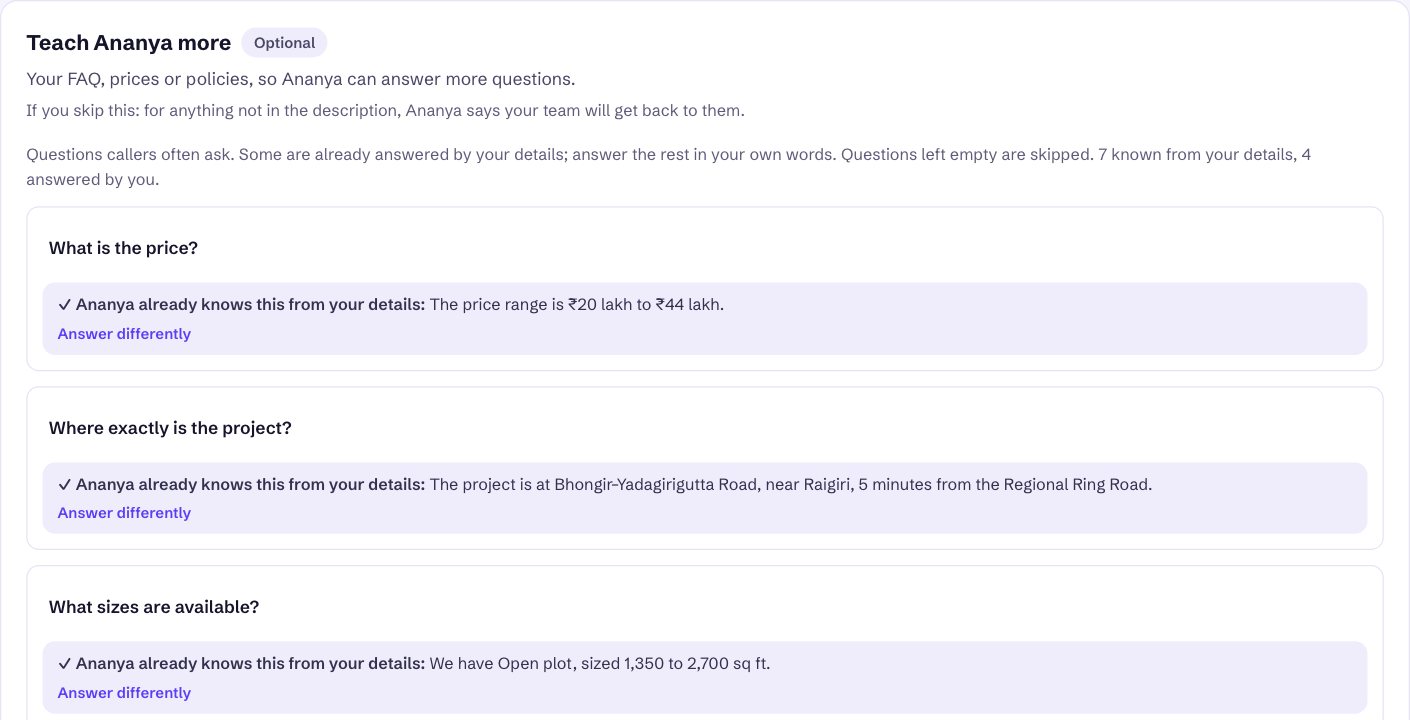
Teach Ananya more (optional), then save
Questions buyers often ask. Those your form already answers show ✓ Ananya already knows this from your details; nothing to do.
Answer the rest in your own words: booking amount, other charges (registration, GST, clubhouse), maintenance, parking, model flat, weekend visits. Click Remove on questions that don't apply. For plots that means maintenance, car parking and model flat. Questions left empty are skipped. Put anything else, like payment plans or free pickup for site visits, in Anything else Ananya should know.
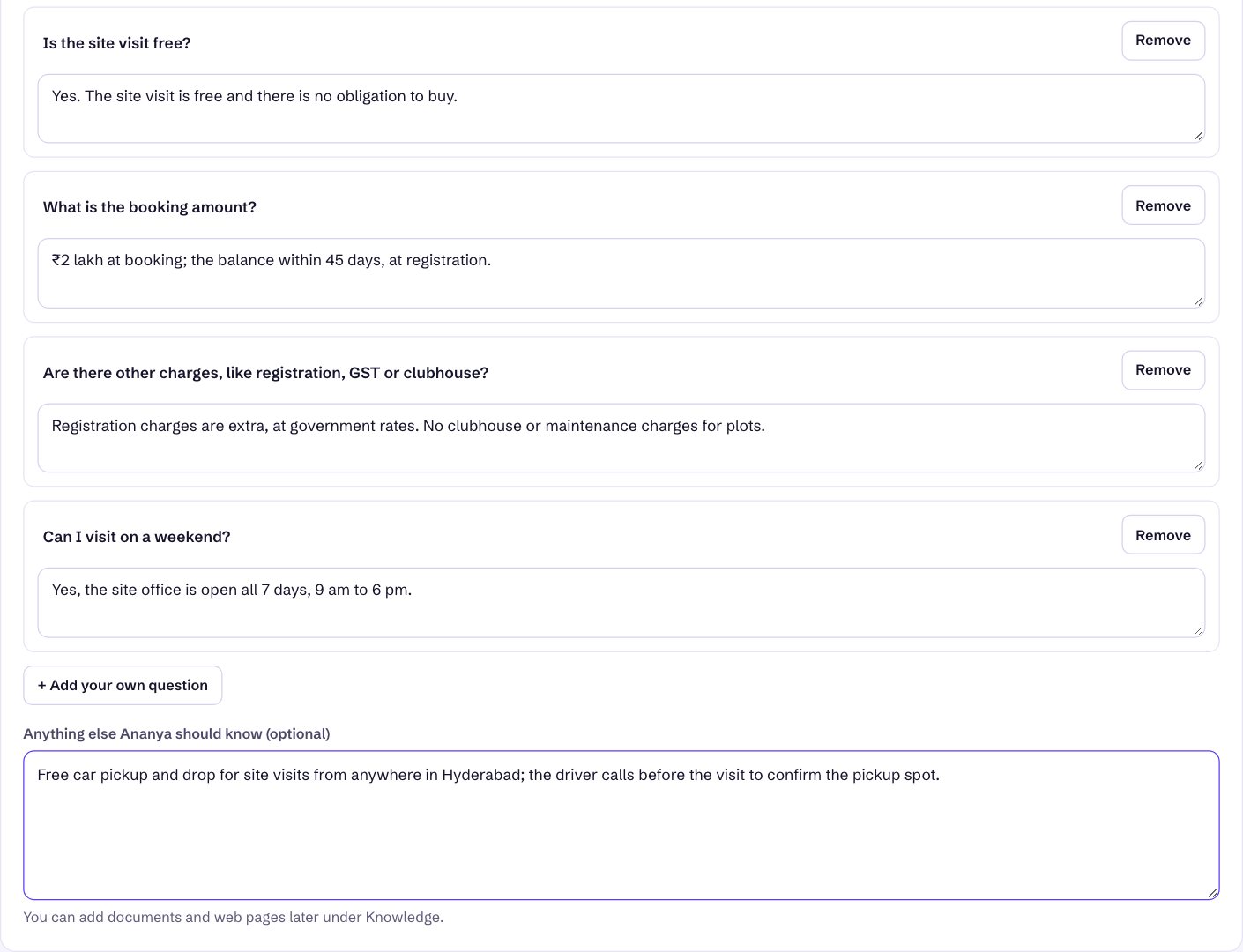
Click Save and continue. Ananya is saved in training: she makes only test calls until you press Start working.
5. Phone number, WhatsApp, calendar and a test call
After saving you land on Finish setting up Ananya, a checklist. You do this once for the whole business, not per project.
| Step | What to do | Why |
|---|---|---|
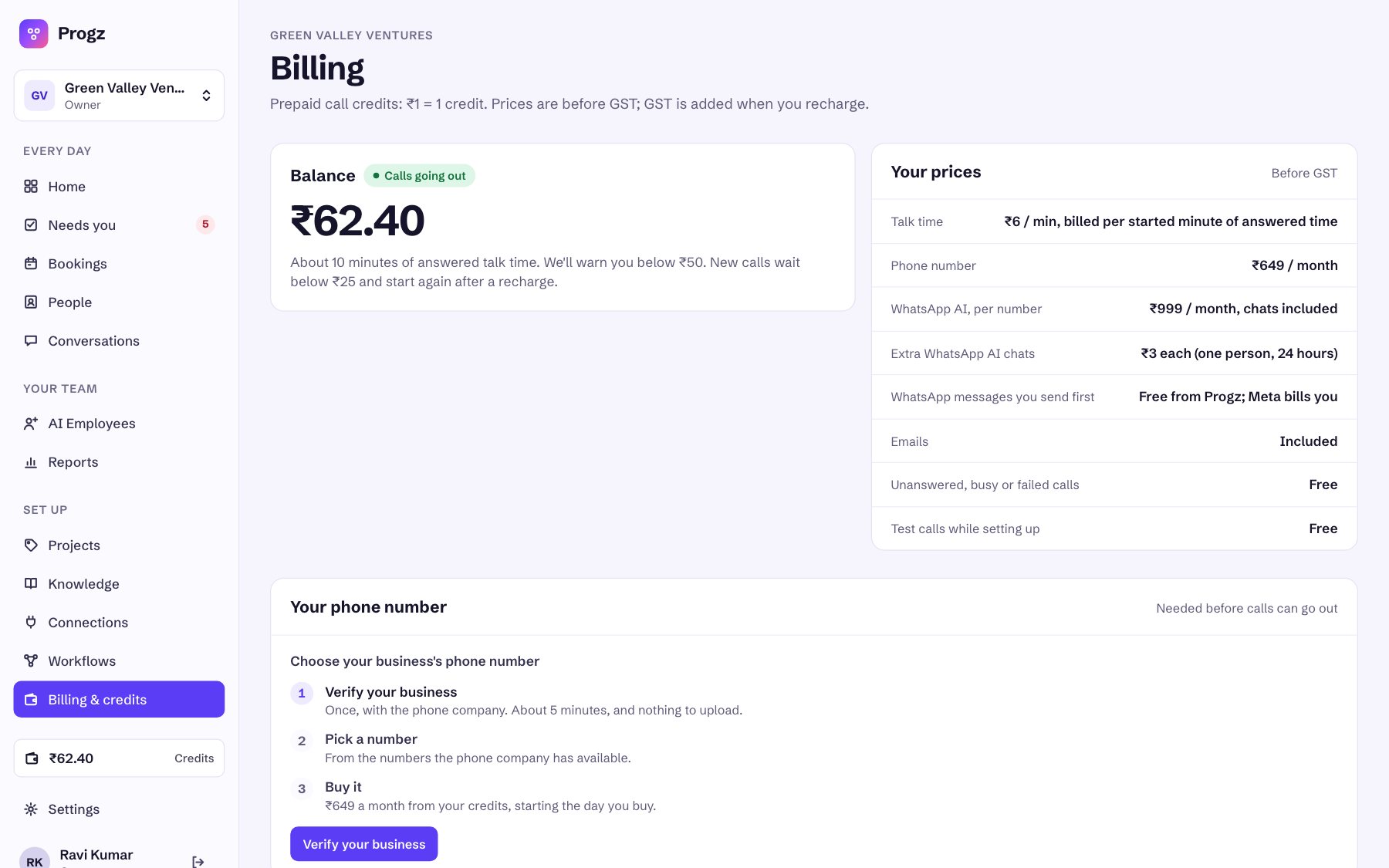
| Phone line Required | Go to Billing & credits → Your phone number. Verify your business with the phone company (once, about 5 minutes, nothing to upload), pick a number and buy it. It costs ₹649 a month from your credits, starting the day you buy. | The number Ananya calls from and buyers can call back. |
| WhatsApp Required | Connect your WhatsApp: sign in with Facebook and pick your business number. Meta approves the message templates (minutes, up to a day). | Booking confirmations and after-hours notes go from your own number, with your business name. |
| Calendar Recommended | Connect Google Calendar, then set your bookable days and hours. | Ananya offers only free times and books visits straight into it. Without it, qualified buyers come to your team to book. |
| Email Optional | Nothing to set up. | Confirmations also go by email with your business name; replies reach your own inbox. |
| Calling hours | On Ananya → Phone & WhatsApp, e.g. 9:00 AM–8:00 PM, all 7 days. | Enquiries outside the hours get a WhatsApp saying when Ananya will call; she calls first thing. |
Try it on yourself (free)
In Try it yourself, enter your name and mobile number, tick the WhatsApp confirmation and click Call me now. Ananya calls you exactly as a buyer would hear her, about your first project. Act like a buyer: give a budget in crores, ask about the RERA number, say you're busy. The result shows on the page, and the full call is under Conversations.
Start working
When the checklist shows the required steps done, click Start working. Ananya is now Live and calls every new enquiry for your active projects. You can Pause her any time from her page.
6. Add your other projects, one by one
Repeat these five steps for every project: add → adjust questions and rules → create the enquiry link → Start → share the link. About 10 minutes each. Ananya keeps the same name, voice and phone number for all of them.
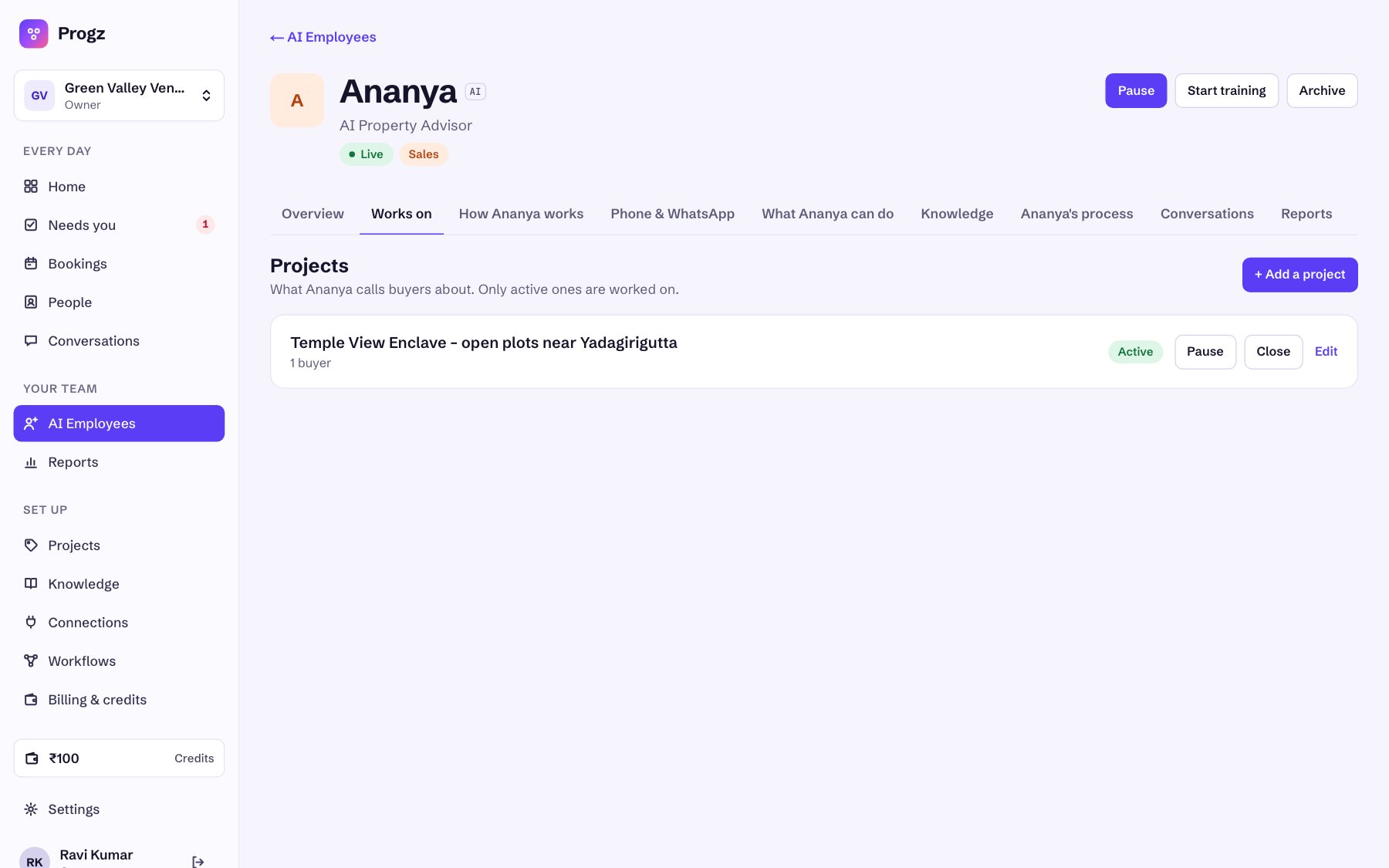
Open AI Employees → Ananya → Works on → + Add a project
(Or use Projects in the left menu.) Fill the same short form as before: name, location, configurations, sizes, price range, possession, amenities, approvals, project size, loan tie-ups and anything else.
Enter this project's site-visit address and click Add project
Each project has its own address, e.g. the show villa for villas and the sales office for apartments. The new project starts as a Draft with the usual questions.
Adjust the questions and rules for this project, then Save changes
The project opens below its name. Reword or untick questions, and set this project's own rules, then click Save changes. Rules differ between projects, and that's the point:
| Project | Minimum budget | Buying within | Question changes |
|---|---|---|---|
| Open plots, ₹20–44 lakh | ₹15,00,000 | 180 days | Q1 lists plot sizes; “build a house or investment?” |
| 2 & 3 BHK, ₹78 lakh–1.25 crore | ₹70,00,000 | 180 days | Untick “Which areas” |
| 4 BHK villas, ₹2.8–3.6 crore | ₹2,50,00,000 | 90 days | Untick “Which areas” |
Create this project's enquiry link, then press Start
Click Create enquiry link. Every project has its own link, so a buyer who fills it is matched to that project and Ananya talks about the right one. Then click Start. The badge turns Active, and Ananya calls this project's buyers from now on.
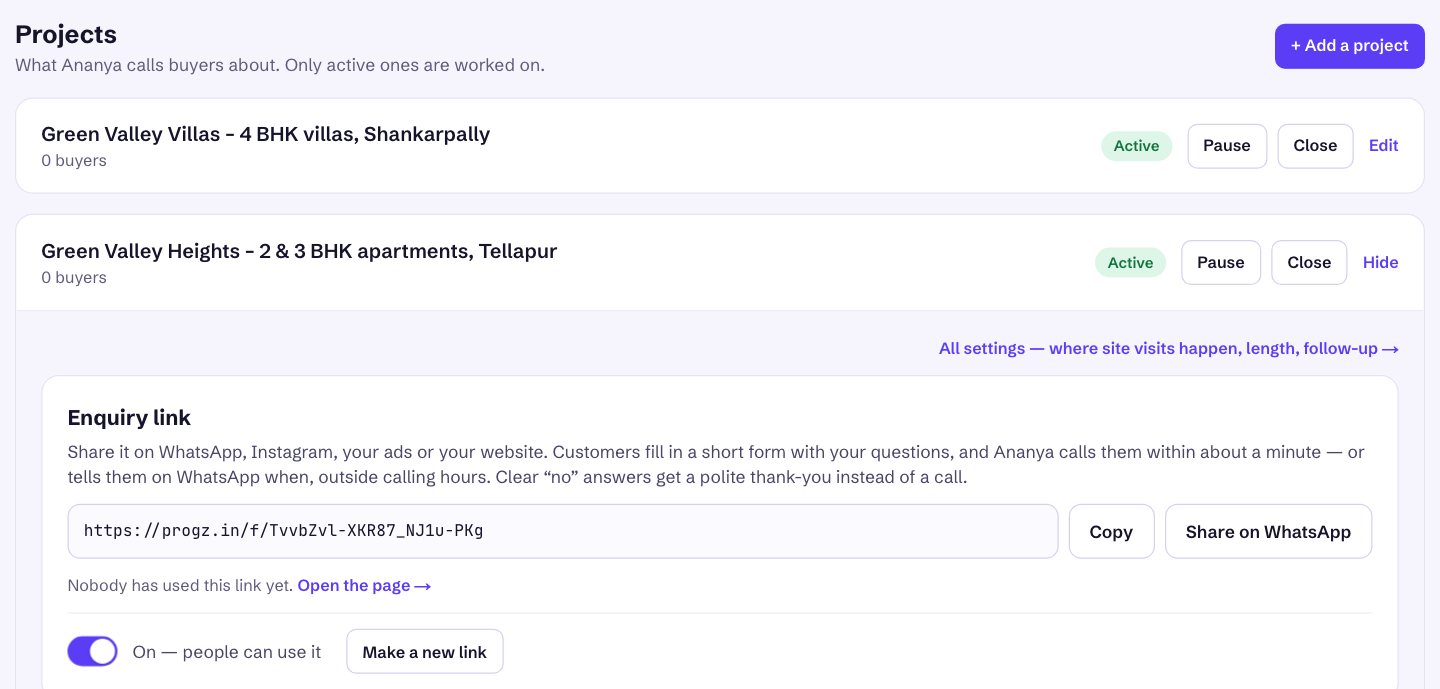
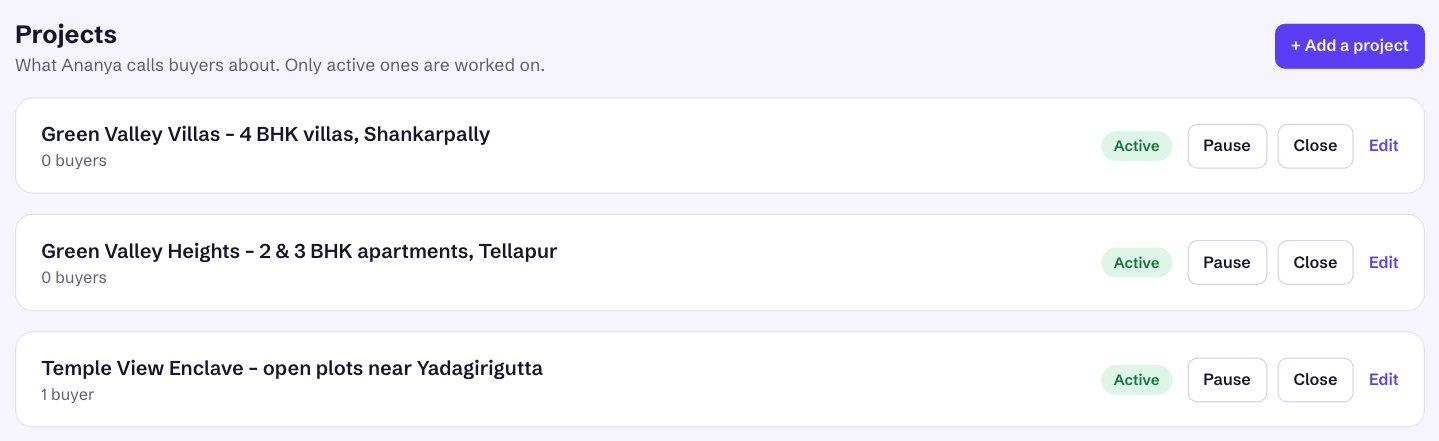
Check the list and repeat for the next project
All your projects are on Works on. Only active projects are worked on.
| Button | Use it when… | What happens |
|---|---|---|
| Pause | A project is on hold: price revision, launch not yet open, team on leave. | No new calls for it; enquiries wait. Press Start to continue. |
| Close | A project is sold out or withdrawn. | Ananya stops calling about it. You can reopen it later. |
| Edit | Prices, possession date or offers change. | Ananya uses the new details from the next call. |
7. Send each project's buyers to the right project
Every buyer belongs to one project. That decides what Ananya talks about and which rules apply. There are four ways in, and each one lets you pick the project.
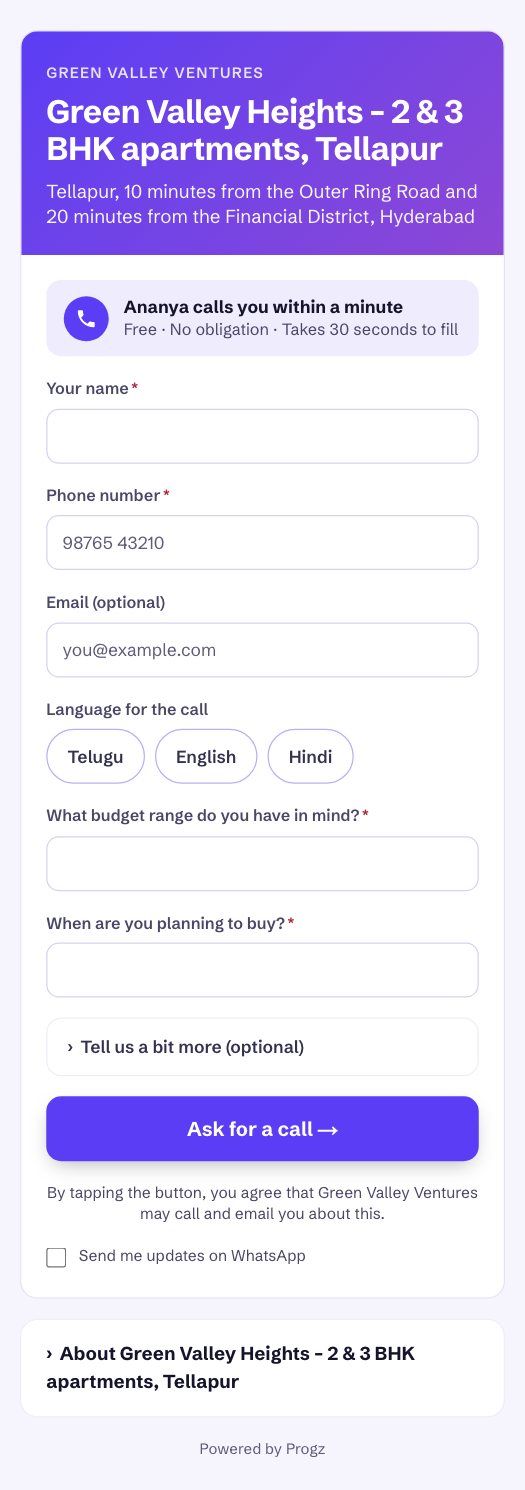
The project's enquiry link (best for ads)
Put each project's own link in that project's Facebook / Instagram ad, website page, WhatsApp status and brochure QR code. Buyers see the project name and location, type their name, phone and answers to your required questions, and get a call within a minute.
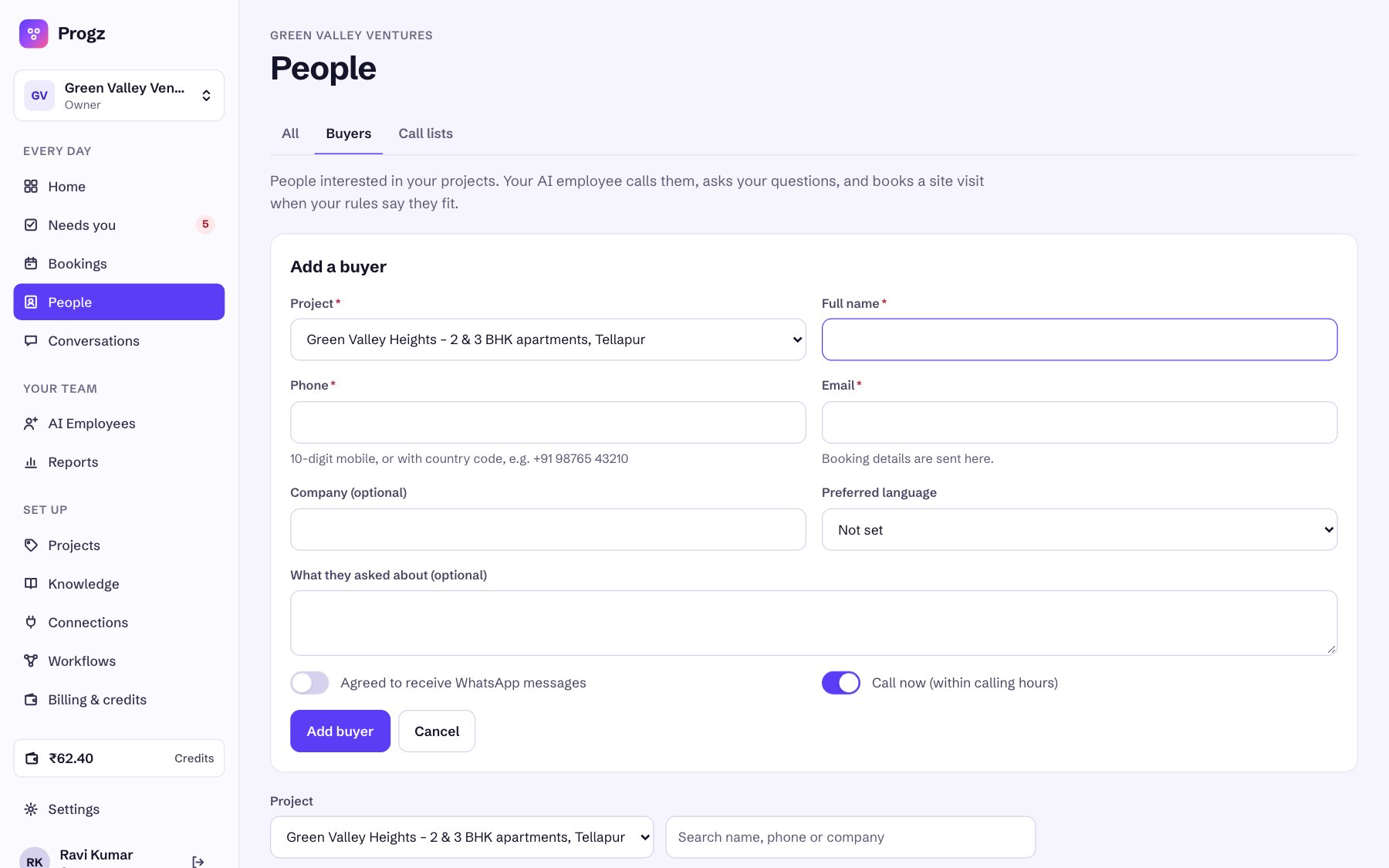
Add buyer (walk-ins and phone enquiries)
People → Buyers → Add buyer. Choose the Project first, then name, phone and email. Leave Call now on and Ananya calls within a minute.
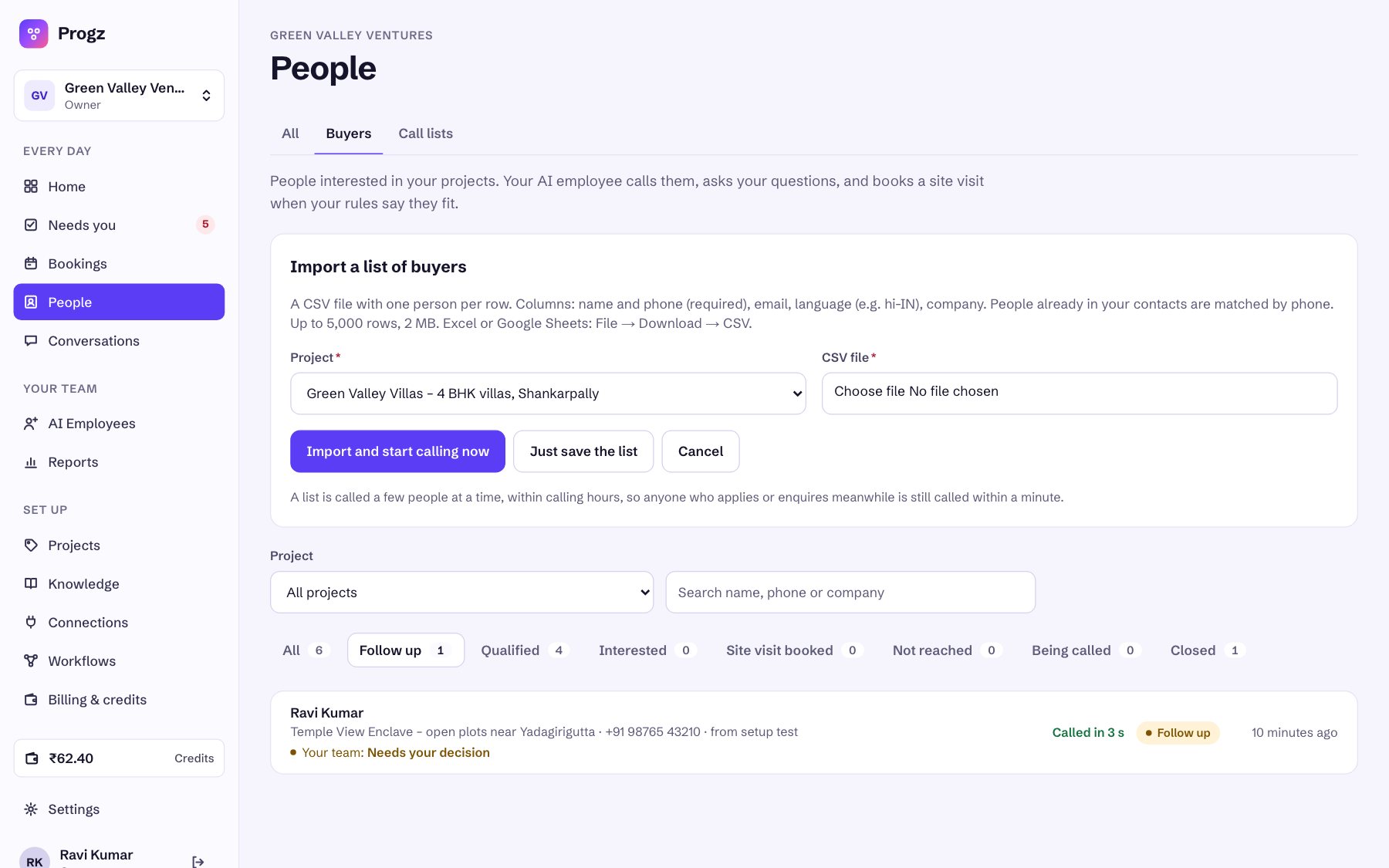
Import CSV (portal leads, old lists, expo registrations)
People → Buyers → Import CSV. One file per project: choose the project, then the file (columns: name and phone; email, language and company optional). Import and start calling now calls a few at a time within calling hours; Just save the list calls nobody yet.
From your website or CRM (API)
Your developer can send leads to /api/v1/leads with an API key from Settings → API keys, including the project's id.
8. Day to day: buyers, site visits and your team
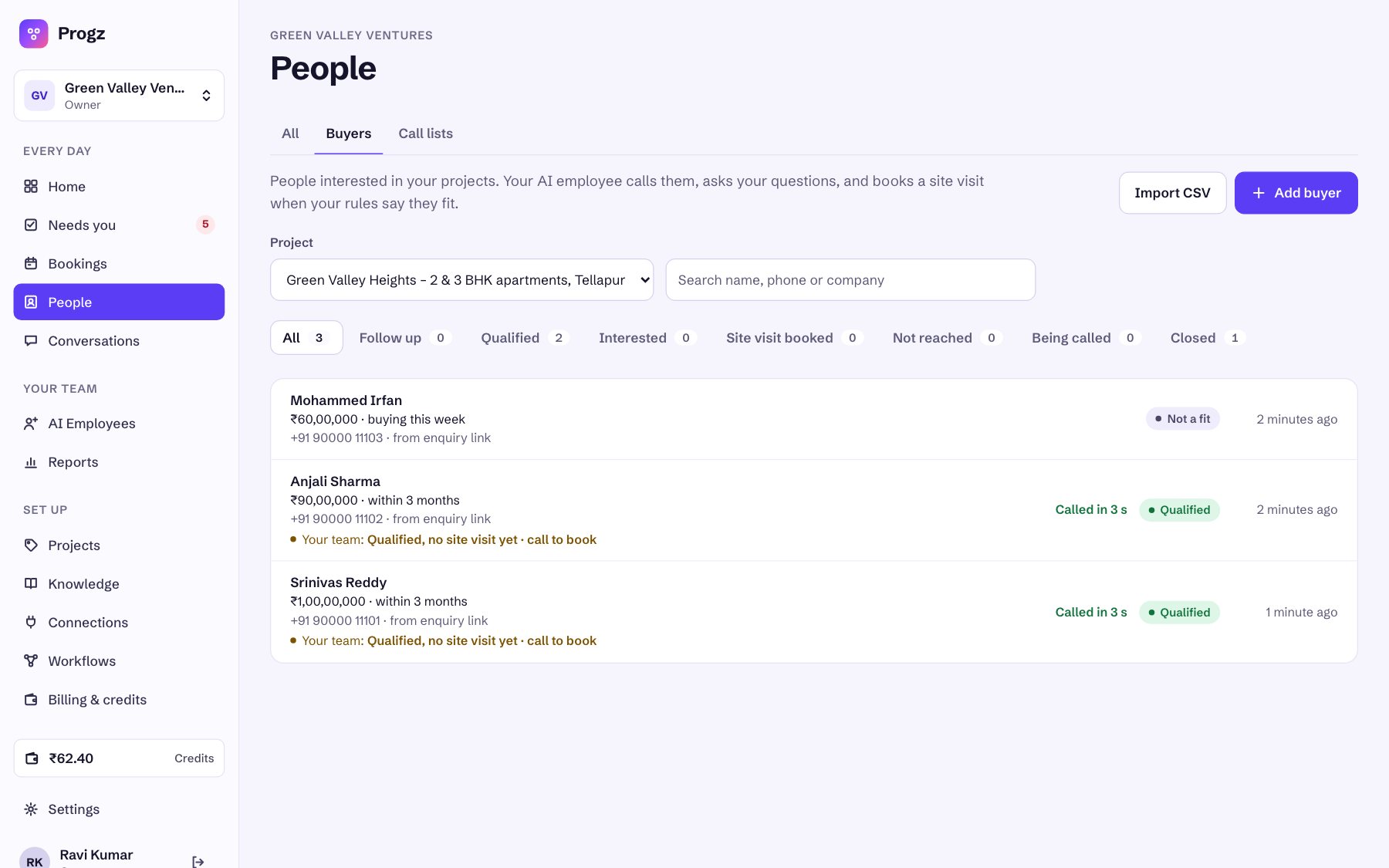
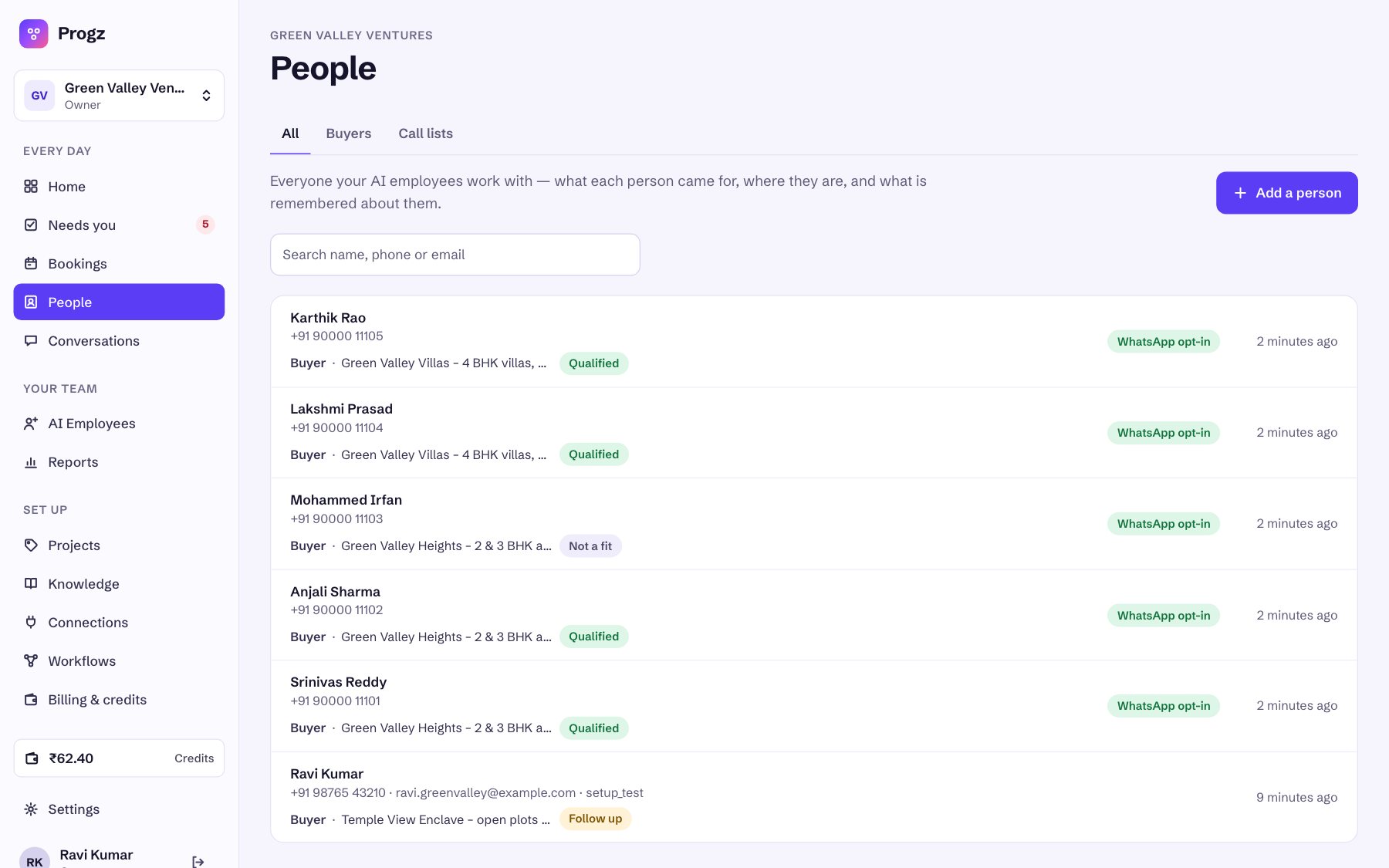
People → Buyers, filtered by project
Pick a project at the top to see only its buyers, what they told Ananya (budget, timeline), how fast they were called and where they are: Qualified, Site visit booked, Not reached, Not a fit, Closed. Click a buyer to see the answers, the rule checks, the booking, the call recording and transcript.
| Where | What you'll find |
|---|---|
| Needs you | Buyers who need a person: asked for a human, unclear answers, qualified but not yet booked (“call to book”), a price or discount request. Decide or call them, then mark it done. |
| Bookings | Every site visit across projects, with time, buyer and address. |
| Conversations | Every call and message, word by word, with recordings. |
| Reports | Calls, site visits booked and outcomes over time. |
| Settings → Team | Invite your sales team so they can see buyers and handle tasks. |
What happens on each call
- Ananya checks she's speaking to the right person and asks if it's a good time.
- She explains the project they enquired about and asks your questions, saving each answer.
- That project's rules decide: fits → up to three free times and the site visit is booked; not ready yet → a call back after the follow-up period; not a fit → a polite thank-you; unclear or wants a person → a task for your team.
- The confirmation goes out on WhatsApp and email with the time, the project's address and how to reschedule.
9. Credits and GST invoices
- Prepaid credits: ₹1 = 1 credit. Recharge from Billing & credits by UPI or card, from ₹500 plus 18% GST. Every recharge gets a GST invoice; add your GSTIN under invoice details to claim it.
- Talk time: ₹6 a minute, billed per started minute of answered time. Unanswered, busy and failed calls are free, and so are test calls during setup.
- Phone number: ₹649 a month from credits. One number serves all your projects.
- Emails are included. WhatsApp template messages are free from Progz; Meta bills you directly for them.
- You'll be warned when the balance drops below ₹50. New calls wait below ₹25 and restart automatically after a recharge, so keep a buffer during ad campaigns.
10. Tips, safety and quick fixes
Tips for good results
- Write each project like a brochure summary. Ananya can't invent details. Anything missing becomes “our team will confirm at the visit”.
- Name projects the way buyers say them, including type and area: “Green Valley Villas – 4 BHK villas, Shankarpally”.
- Keep each project's facts in that project. Use Knowledge only for things true of every project (company history, payment process, office timings).
- Update prices the day they change with Edit. Close sold-out projects the same day.
- Test each new project by filling its enquiry link with your own number before you spend on ads.
If something looks wrong
| You see | Why | Fix |
|---|---|---|
| Calls don't go out at all | No phone number yet, or credits below ₹25 | Billing & credits: finish the number steps or recharge |
| A project gets no calls | It's a Draft or Paused | Works on → press Start |
| Ananya talked about the wrong project | The ad or CSV used another project's link or list | Check each ad's link; re-import with the right project |
| Can't press Start on a project | Site-visit address or a question for a rule is missing | Open the project → All settings |
| Qualified but “call to book” | No calendar connected, or no free slot | Connect Google Calendar and set bookable days |
| No WhatsApp confirmation | Buyer didn't opt in, or Meta is still reviewing templates | Email still goes out; check Connections |
| Calls at night are held | Outside your calling hours | That's on purpose; change hours on Phone & WhatsApp |